> For the complete documentation index, see [llms.txt](https://water-strategy.gitbook.io/waterstrategy/llms.txt). Markdown versions of documentation pages are available by appending `.md` to page URLs; this page is available as [Markdown](https://water-strategy.gitbook.io/waterstrategy/portugues/nocoes-basicas-de-modelagem/parameters/hdf5-parameter.md).

# Parâmetro HDF5

## Descrição geral

Este parâmetro lê dados de matriz de um banco de dados HDF PyTables.

O parâmetro lê dados usando a interface de matriz PyTables e, portanto, não exige o carregamento de todo o conjunto de dados na memória. Isso é útil para grandes execuções de modelos. [API Referência](https://pywr.github.io/pywr-docs/master/api/generated/pywr.parameters.TablesArrayParameter.html#pywr.parameters.TablesArrayParameter)

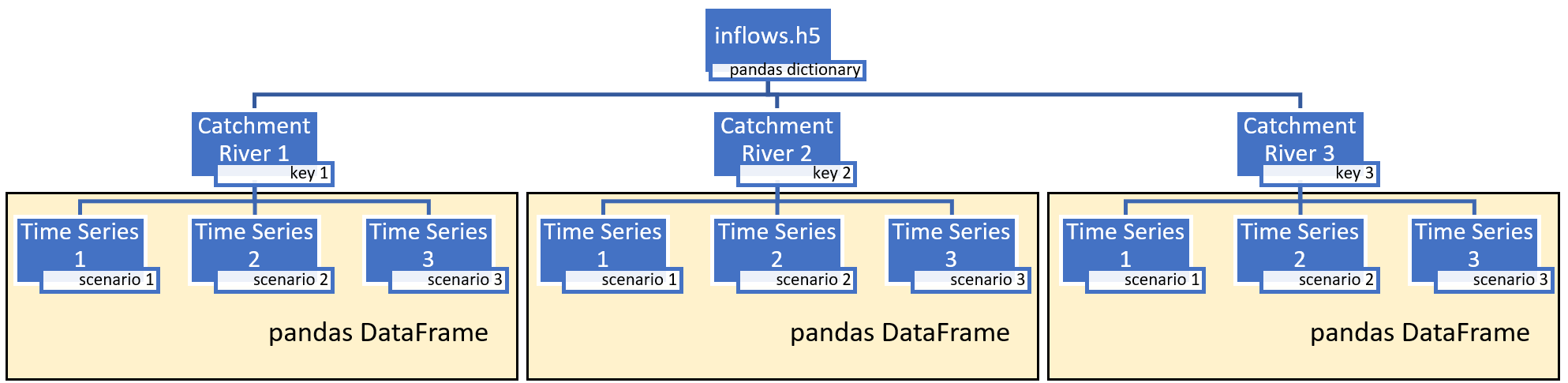
Ao armazenar arquivos HDF5 no formato “fixo”, os usuários podem obter velocidades ideais de acesso aos dados, tornando o HDF5 uma ferramenta eficaz para cenários PyWR que usam DataFrames como parâmetros, onde a recuperação rápida de dados é crucial. Os arquivos HDF5 são lidos como um dicionário, onde cada chave representa um DataFrame pandas. Por exemplo, a estrutura de um arquivo.h5 de entrada pode conter três chaves, cada uma representando um rio diferente. Cada chave contém três séries temporais que podem ser atribuídas a um cenário Pywr de tamanho 3.

Se estiver usando o arquivo h5 DataFrame para executar cenários pywr, consulte [seção pywr-scenarios](/waterstrategy/modeling-basics/scenarios/pywr-scenarios.md) para ativar esse recurso

**Nota:** O tamanho dos cenários pywr deve corresponder ao número de chaves no arquivo h5

## Atributos

<table><thead><tr><th width="158">Nome</th><th width="409">Descrição</th><th>Obrigatório</th></tr></thead><tbody><tr><td>arquivo h5</td><td>O identificador do arquivo da tabela ou o nome do arquivo ao qual anexar os objetos cArray. Se um nome de arquivo for fornecido, o objeto abrirá e fechará os identificadores do arquivo.</td><td>sim</td></tr><tr><td>nó</td><td>Nome do nó no banco de dados de tabelas do qual ler os dados</td><td>sim</td></tr><tr><td>onde</td><td>Caminho a partir do qual ler o nó</td><td>sim</td></tr><tr><td>cenário</td><td>Cenário a ser usado como segundo índice na matriz</td><td>sim</td></tr></tbody></table>

## Exemplo

<figure><img src="https://2780811623-files.gitbook.io/~/files/v0/b/gitbook-x-prod.appspot.com/o/spaces%2Ft4nCBOybr5foLIqkmwa6%2Fuploads%2Fgit-blob-846adaf63d356d2aa1bebd28c57e964c7f9f9d62%2Fimage%20(369).png?alt=media" alt=""><figcaption><p>Entradas de estrutura.h5</p></figcaption></figure>

```json
{
	“chave”: “Bacia hidrográfica 1",
	“cenário”: “Mudança climática”,
	“tipo”: “DataFrameParameter”,
	“url”: “influxos.h5",
	“index_col”: “etapa de tempo”,
	“parse_dates”: verdadeiro
}

```


---

# Agent Instructions
This documentation is published with GitBook. GitBook is the documentation platform designed so that both humans and AI agents can read, navigate, and reason over technical content effectively. Learn more at gitbook.com.

## Querying This Documentation
If you need additional information that is not directly available in this page, you can query the documentation by asking a question.

Perform an HTTP GET request on the following URL with the `ask` and `goal` query parameters:

```
GET https://water-strategy.gitbook.io/waterstrategy/portugues/nocoes-basicas-de-modelagem/parameters/hdf5-parameter.md?ask=<question>&goal=<user_goal>
```

`ask` is the immediate question: it should be specific, self-contained, and written in natural language.
`goal` is what the user is ultimately trying to achieve, the reason they need the answer. Sharing it helps GitBook give you a better, more relevant answer. A goal is most helpful when it describes the outcome the user wants rather than restating the question. For example, with `ask=how do I create an API token`, a goal like `automate deployments from our CI pipeline` lets GitBook tailor the answer to that use case.

The response will contain a direct answer to the question and relevant excerpts and sources from the documentation.

Use this mechanism when the answer is not explicitly present in the current page, you need clarification or additional context, or you want to retrieve related documentation sections.
